What’s new
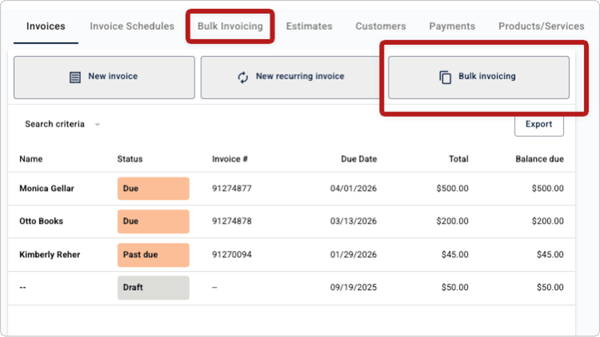
Small businesses can now create and send invoices in bulk, making it easy to bill large groups of customers at once instead of creating invoices one by one. With Bulk Invoicing, businesses can generate multiple invoices—up to 500—in a single workflow, review them, and send them together in just a few steps.
Bulk Invoicing is available to small businesses banking at financial institutions with Autobooks Pro.
Why this matters
Many businesses bill the same product or service to groups of customers at the same time. That might include membership dues, recurring services, or invoices generated after a successful promotion or busy period.
When invoice volume increases, manual billing can quickly become a drain on time and attention. Bulk Invoicing keeps billing from becoming a bottleneck, giving businesses a faster way to send invoices at scale while staying focused on running their business, without adding unnecessary administrative work.
For financial institutions, Bulk Invoicing expands the range of business models that can be supported within the bank’s digital experience, helping keep high-volume billing activity, and the relationships behind it, anchored to the institution.
How it works
Bulk Invoicing is designed to handle high-volume billing with speed and control:
- Download and complete a CSV template
Small businesses download an Autobooks CSV template and enter invoice details, with each row representing a separate invoice. The template helps ensure invoices are formatted correctly before upload. - Upload, validate, and review
The completed CSV file is uploaded into Autobooks, where it is validated for formatting issues. Autobooks then displays each invoice in a review list, giving businesses the opportunity to confirm details or correct errors before sending. - Send invoices at scale
Once validated, invoices are sent together in a single action. Autobooks handles invoice creation in the background, including automatically creating customers and products from the CSV file when they do not already exist.
After sending, each invoice behaves like a standard Autobooks invoice and can be viewed, canceled, or resent individually from the Invoices tab or the Bulk Invoicing view.
Who it’s for
Bulk Invoicing is designed for businesses that invoice at scale across a wide range of operating models, including, but not limited to:
- Membership and dues-based organizations
- Homeowner associations and property managers
- Utilities and recurring service providers
- Municipalities
- Subscription-based businesses
- Businesses running promotions or special offers that result in the need for high-volume invoicing
- Financial institutions managing high-volume billing needs, such as appraisal or administrative fee
Availability
Bulk Invoicing is available to small businesses banking at financial institutions with Autobooks Pro.
Interested in learning more about Autobooks Pro? Reach out to our team to learn how Autobooks Pro can expand the capabilities available to the businesses you serve