We’ve introduced a new feature that gives your small business customers more control over how they present fees on their invoices. With the new Service Charge option, businesses can apply an additional line item to help recover operating costs in a way that is clear, fair, and compliant.
Unlike surcharges, which are tied to the customer’s payment method and subject to regulation, service charges are applied to the invoice as a whole. This makes them consistent, transparent, and easier to manage.
Why we built this
Small businesses often look for ways to recover some of the cost of doing business, especially when it comes to accepting digital payments. However, surcharges bring risk. Rules vary by state, card network, and payment processor. One misstep could result in fines or a frozen account.
The new service charge feature provides a safer, more flexible option that avoids these pitfalls. It gives small businesses a way to offset expenses while maintaining customer trust and full compliance with payment network rules.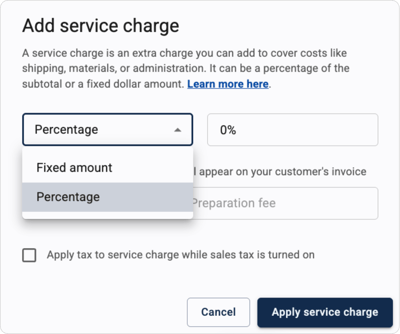
What financial institutions need to know
- Service charges apply to the invoice total, not the payment method
- The charge appears in the invoice summary section, near sales tax and discounts
- Businesses can name the charge, set a percentage or fixed amount, and choose whether it is taxable
- Autobooks automatically categorizes service charges as "Other Income" in the accounting system
- Refunds automatically include the service charge amount
To protect your institution and your customers, small businesses are required to name service charges in a way that does not imply a surcharge. For example, terms like "Credit Card Fee" or "Processing Fee" are not permitted. Clear in-app guidance is provided to help users name these fees appropriately.
What customers will see
From the payer's perspective, the invoice will include a clearly labeled service charge in the summary section. The total amount of the charge is shown, but any percentage used to calculate it is not displayed.
This feature helps small businesses present fees clearly and fairly while minimizing compliance concerns for your institution.