Cash Flow Forecast Added to Autobooks Capital
Capital-eligible small business customers can now see a 30-day cash flow forecast, model the impact of working capital, and act on their offer without leaving their Autobooks dashboard.
Autobooks Hub Updates — May/June 2026
Navigation updates, email configuration improvements, a redesigned SMB Detail View, front line banker workflow changes, and more.
Released: June 5, 2026
This release includes improvements to navigation, reporting, key workflows, and several views inside the Autobooks Hub, all designed to make it easier to find what you need and get things done. These changes are driven by feedback from our financial institution partners who use the Autobooks Hub to manage and grow their programs.
What's new
Left navigation changes
Several navigation labels have been updated to match how teams move through the Hub. View Reports is now two separate tabs: Profit Sharing and Reports. Small Businesses is now SMBs. Capital Accounts is now Capital. The referral entry is now Referral Form and Referral Tracking (admin only). Marketing Tools is now Marketing.
Reporting: Data view removed, Profit Sharing tab added
The Data tab is no longer a standalone item. Most data from that view is available in the SMB and Payments tabs. A new standalone Profit Sharing tab has been added, showing profit share information for your program separately from the general Reports tab.
FI domain verification and front line banker email authorization
The domain verification step and the toggle for enabling front line banker emails to SMBs from the Hub are now two separate controls. The FI Admin can verify a domain independently, then decide separately whether to allow front line bankers to send emails to customers directly from the Hub. Once a domain is verified, Configure Email is on by default. Admins can turn it off if they want to restrict email sending to admins only. Admins can always send emails from the Hub regardless of how that toggle is set.
Frontline Banker: lead submission form and Progress Center updates
The lead submission form has been moved to the top of the Frontline Banker landing page. Legacy training information has been removed. In the Progress Center, the list of small business leads is now at the top of the page, with supporting information below.
Small Business Detail view redesign
The SMB Detail View has been redesigned to surface more information at a glance. Contact information fields now include click-to-copy functionality. Tabs have been renamed for consistency across the Hub. Static SMB alert messages have been removed. A Status Guide now appears as a pop-up from the Status Check box, giving context for each status level. A high-level summary of SMB payment metrics has been added to the overview.
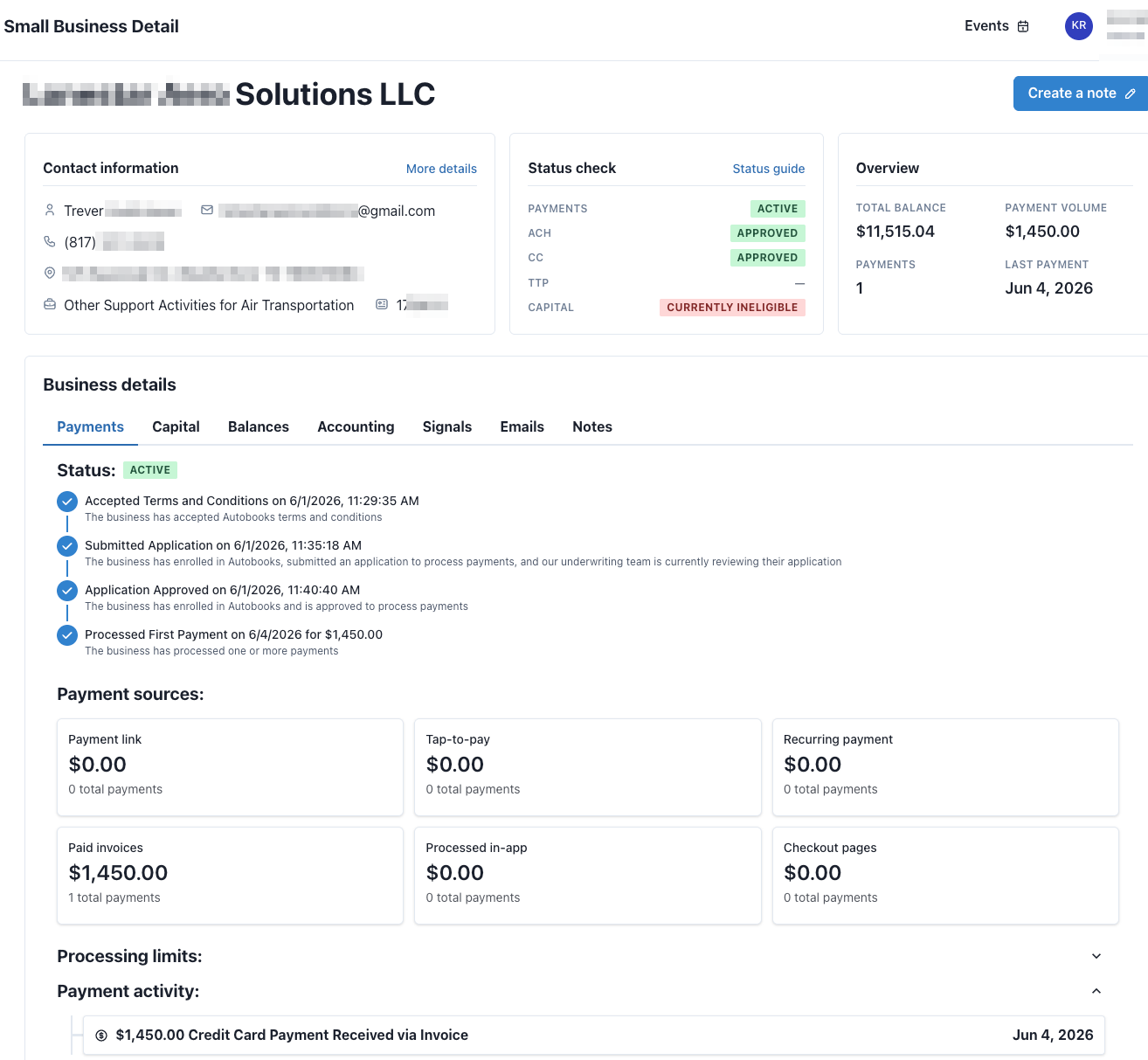
Table filter chips and sticky headers
Tables across the Hub now show a running list of the filters currently applied as filter chips. Table headers remain visible while scrolling through data.
Light mode updates
Small design refinements have been made for light mode users.
Real-time user management
When a Hub user is added or removed, the change is reflected immediately without requiring a browser refresh.
CSV export for user management
Admins can now export their full Hub user list to a CSV file, making it easier to manage users outside the Hub. The export includes additional columns: Date added, Last login, and Total logins.
Quick role changes
Admins can change a user's role directly from a dropdown in the Users list, without leaving the page.
Role details at a glance
A new role details view shows exactly what each role, Admin, Read Only, and Front Line Banker, can access across Settings, the Hub, and Tools. Admins can check this any time they need to confirm what a given role can or cannot do.
Data export respects hidden columns
Columns an admin has hidden in the Payments or SMB tables will no longer appear in CSV exports of those tables. Hidden stays hidden, whether you're viewing the table or exporting it.
Why does it matter?
Running an effective small business program takes tools that work the way your team works. This release reflects what we’ve heard from financial institutions using the Hub and what we’ve seen in how their teams engage with it every day. We made targeted improvements to navigation, workflows, and key views so the Hub better matches the way your program runs. We’ll keep listening and keep building, because the goal is to give you the tools you need to manage and grow your program with confidence.
How does it work?
All updates in this release are live. No configuration is required for most changes. The email configuration update is the exception. If you have a verified domain and do not want front line bankers sending emails to customers from the Hub, log in and toggle Configure Email off. Admins can always send from the Hub regardless of how that toggle is set.
Who has access?
These updates are available to all financial institutions using the Autobooks Hub. The Referral Form and Referral Tracking navigation entry is admin only.
Related update
Signal Feed, a new view that surfaces notable transaction activity and prescribed next steps across your small business portfolio, launched alongside this release. Read the Signal Feed update.
Resources: TBD