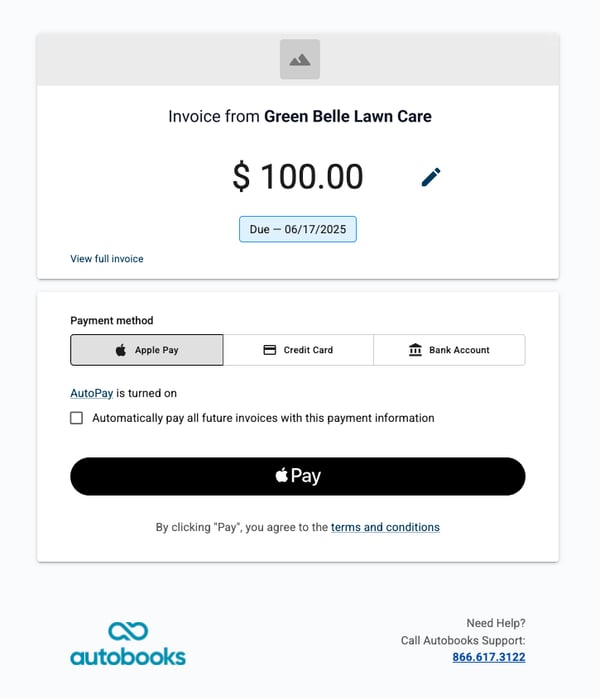
We’ve made it even easier for your small business customers to accept payments. Now, when their customers open an invoice, Apple Pay may appear as a payment option at the top of the form. If it is available on the payer's device and already set up, the payment can be completed with just a tap. No manual card entry. No extra steps. Just fast, secure payments.
If Apple Pay is not available on the customer’s device, the form will default to the standard options they are used to, such as credit card and bank transfer (ACH), so the experience remains simple and familiar.
A better payment experience for their customers
When payments are easy, small businesses get paid faster. Typing in card details, especially on a mobile device, can slow people down or lead to abandoned payments. With Apple Pay, the friction is reduced and the process is more secure and user-friendly.
This update also brings the invoice experience in line with our modern Payment Link design. The layout is cleaner and easier to navigate, with clear confirmation states and helpful guidance built in.
What financial institutions need to know
-
Apple Pay is now supported as a payment option on invoice forms, when available on the customer’s device
-
The updated form layout matches the style of Payment Links, ensuring consistency across all payment types
-
Recurring payments and Autopay are now supported with Apple Pay, just like cards or ACH
-
Improved field validation and confirmation messages help guide customers through a smoother payment process
-
This update is now available on all Autobooks-powered invoice forms. Your small business customers do not need to take any action. They simply send an invoice as usual, and Apple Pay will appear as an option when supported
Device and browser compatibility
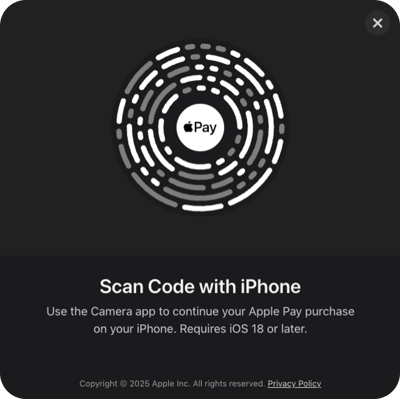
Apple Pay availability depends on the payer’s device, browser, and operating system. In some cases, a QR code will appear on screen that can be scanned with an iPhone to complete the payment. If Apple Pay is not already set up, the customer will be prompted to complete setup before continuing.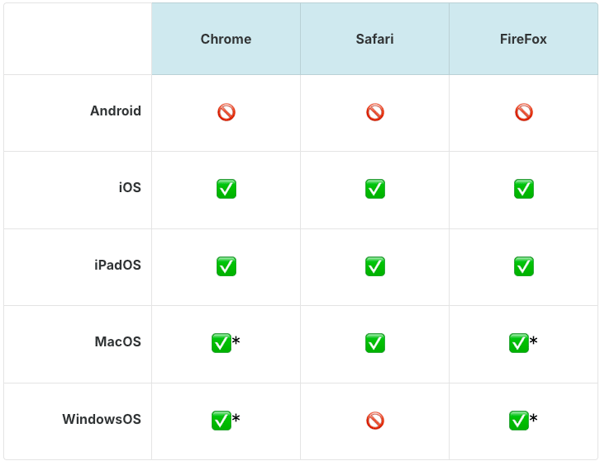
*Customers that are using a third-party browser or non-Apple computer to complete an Apple Pay payment, will need to scan the code provided on screen to complete the payment with their iPhone. If they have Apple Pay setup on their phone, they will be able to continue with Authentication. If not, they will need to complete Apple Pay Set up before completing the payment.
Apple Pay is a service provided by Apple Payments Services LLC, a subsidiary of Apple Inc. Neither Apple Inc. nor Apple Payments Services LLC is a bank. Any card used in Apple Pay is offered by the card issuer.