Product images and inventory control added to Checkout Pages
Checkout Pages are a flexible way for small businesses and nonprofits to collect payments online for products, event fees, services, or donations, with funds deposited directly into their business account at your institution.
This release introduces two important capabilities: image uploads and inventory controls. Together, they strengthen how items are presented to buyers and how availability is managed once sales begin.
February 19, 2026
Image uploads improve clarity at checkout
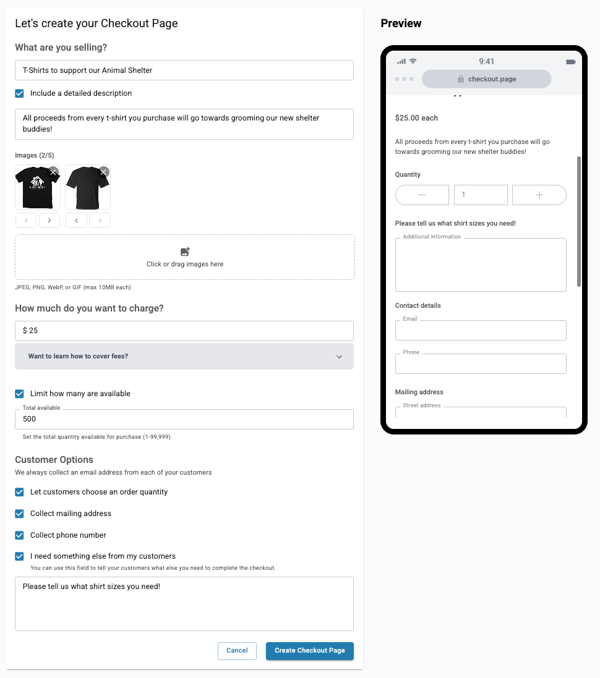
Checkout Pages now support up to five images during page creation.
For businesses selling merchandise, event access, services, or nonprofit campaigns, visuals provide important context. Clear images reduce uncertainty at checkout and allow buyers to see exactly what they are purchasing while remaining inside the digital banking experience.
The builder accepts JPEG, PNG, WebP, and GIF files up to 10MB each. Images can be added using drag and drop and reordered to determine which appears first. The primary image displays prominently across desktop and mobile views.
Inventory limits provide real-time visibility and control
Quantity limits can now be applied to newly created Checkout Pages.
For businesses offering event tickets, limited merchandise, seasonal items, or capped registrations, knowing exactly how many units remain is essential. Inventory limits provide that visibility directly within online or mobile banking.
When building a page, users select “Limit how many are available” and enter a quantity between 1 and 99,999.
Once live, sellers can:
-
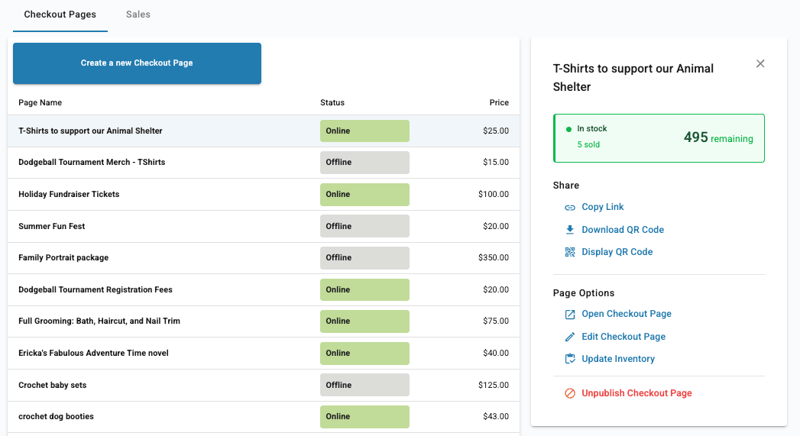
Monitor remaining units
-
View inventory status as In Stock, Low Stock with five or fewer remaining, or Sold Out
-
Prevent purchases beyond available quantity
-
Update inventory to reflect offline sales or restocking
When inventory reaches zero, the page automatically displays Sold Out to buyers.
Inventory limits apply to newly created Checkout Pages. Previously created pages continue to display historical sales counts but do not support quantity limits.
Embedded within your digital experience
Checkout Pages keep payment activity inside your institution’s digital banking platform. With these additions, businesses gain clearer presentation tools and stronger control over availability while managing sales in the same place they manage their accounts.
Availability
Available to all financial institutions and all small businesses and nonprofits using Checkout Pages.
Release date: February 19, 2026